
Sector · Industry, energy and critical infrastructure
AI video analytics for industrial sites and critical infrastructure
A person on the ground, someone entering a hazardous area, an intrusion or a hotspot: Videtics Perception helps teams identify situations for review in compatible camera views. Contextual alerts support the protection of people and facilities, without facial recognition.
Visible-light and thermal cameras · Human review of alerts · Software designed in France
Made in France — software designed and developed in France.
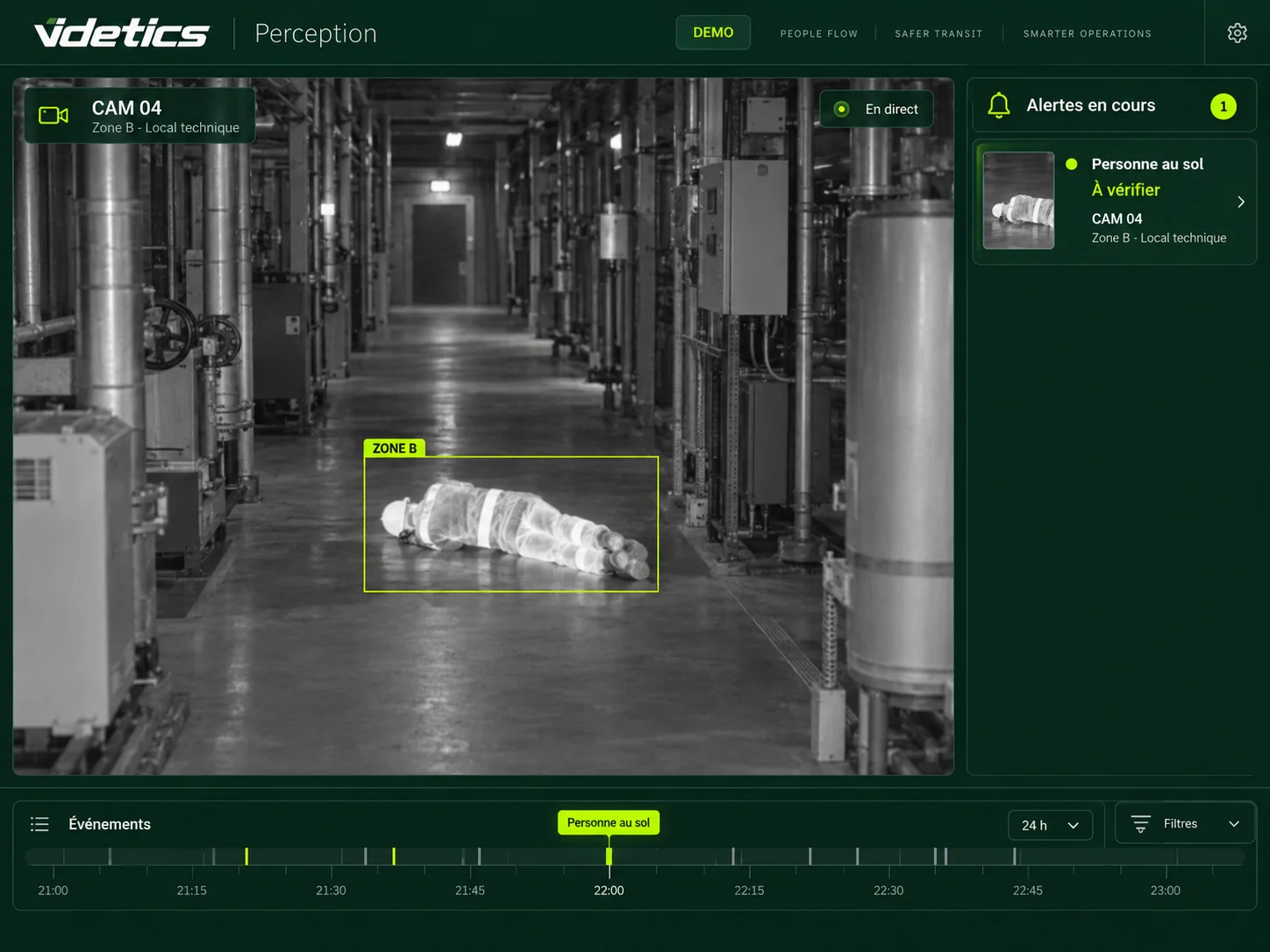
Hundreds of cameras. Who spots what matters?
Cameras record workshops, yards and perimeters. Yet a security desk cannot examine every screen continuously, and remote sites may have no staff present. Reviewing recordings after an incident does not meet every prevention need.
Perception analyses selected streams and flags agreed situations: a posture requiring review, presence in a restricted area, intrusion or a hotspot. A pilot tests each scenario against real site conditions, including lighting, distance, dust and steam.
Support timely assistance
Falls and people on the ground: an image and location to support the checks set out in your procedures.
Monitor sensitive areas
Scenarios configured by zone and schedule, integrated into the site’s verification workflow.
Make operations measurable
Vehicle movements, loading-bay occupancy and dwell time to understand congestion.
01 · People safety
Spot situations that need assistance
Video scenarios complement prevention measures and emergency procedures. They depend on camera coverage and are neither a personal lone-worker alarm nor a certified machine safety function.
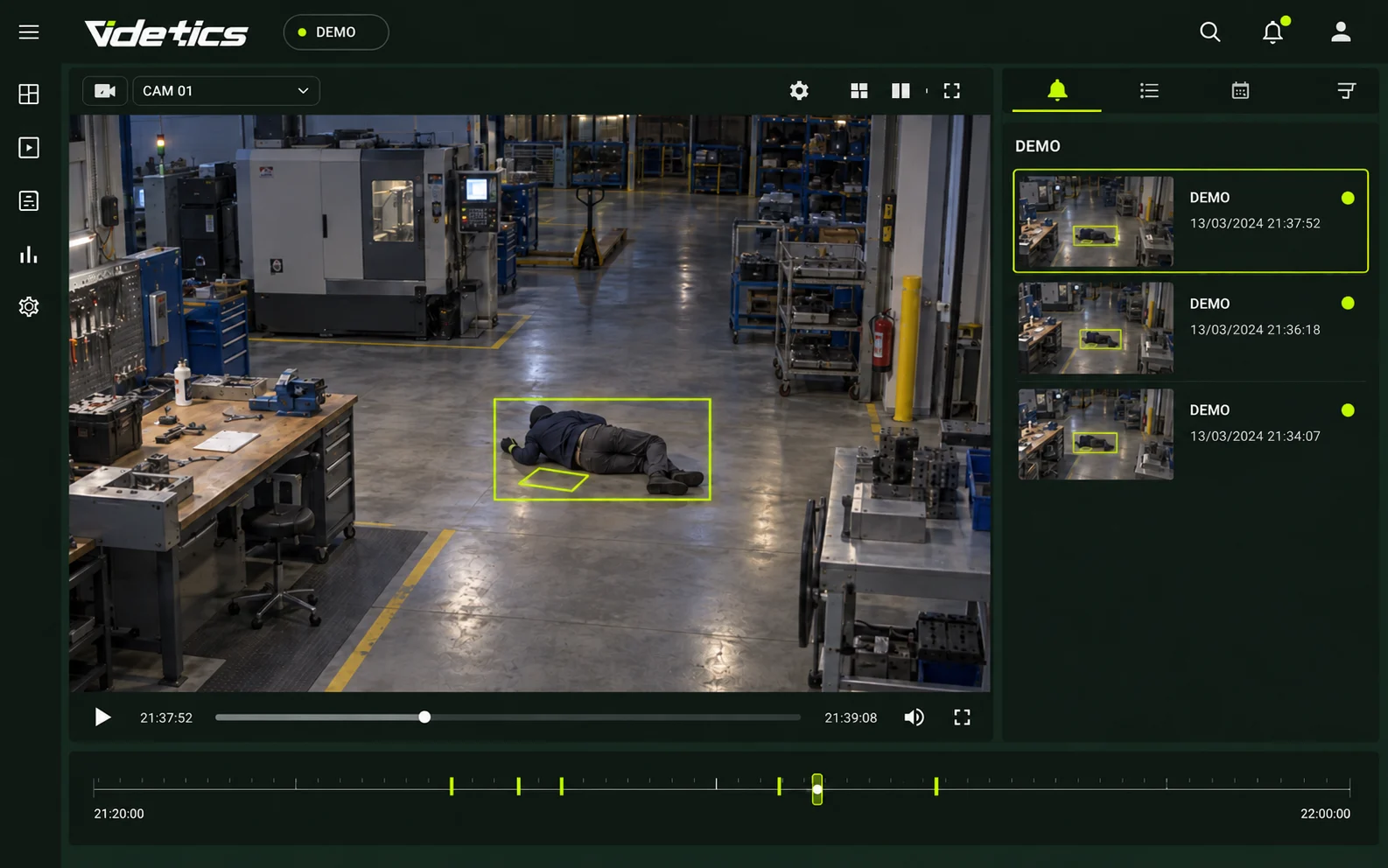
Lone workers: falls and people on the ground
During patrols or maintenance, posture analysis helps flag falls or a person remaining on the ground within a covered zone. Teams receive a location and image for verification and assistance. The scenario and any thermal camera are validated on site.
Silent alerts at reception
A raised-hands posture can generate a discreet alert to security or remote monitoring. Operators check the image: the posture alone does not establish an assault. Recipients and escalation routes are agreed with the site.
Presence in hazardous areas
Define zones and schedules near equipment or loading bays. Detected presence is presented with context. Historical events can inform changes to markings or procedures. Machine stopping and functional safety certification are not assumed.
Pedestrians and moving equipment
Count passages and flag presence outside designated walkways in visible areas. Calibrated speed estimates and event histories support traffic planning. These indicators are not a certified collision-avoidance system.
Zone occupancy and evacuation
Counts and access movements provide an indication of occupancy in covered areas. This can support emergency planning; it does not guarantee a building is empty or replace evacuation checks and roll-call procedures.
02 · Site security
Monitor perimeters and facilities
Fences, plant rooms and storage areas need tailored scenarios. Teams verify alerts under site procedures; performance and transmission times are assessed in real operating conditions.
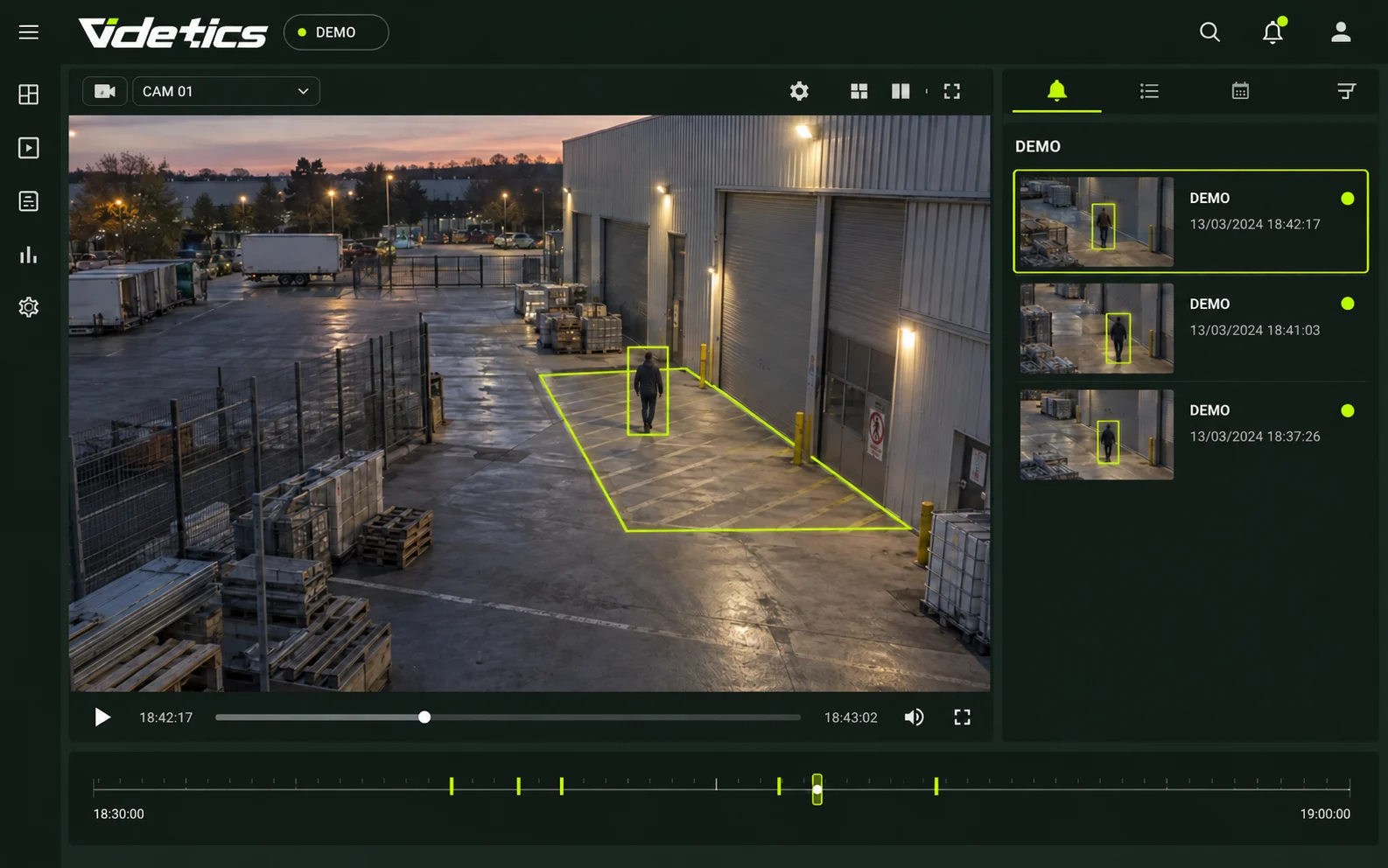
Perimeter intrusion
Zones and crossing lines flag people or vehicles under agreed schedules. Images support security verification. Vegetation, animals and weather effects are assessed during the pilot.
Sensitive areas and plant rooms
Flag out-of-hours presence in suitable views and count passages through an entrance. Integration with access control is not assumed; an image alone does not establish whether someone is authorised.
Thermal hotspots
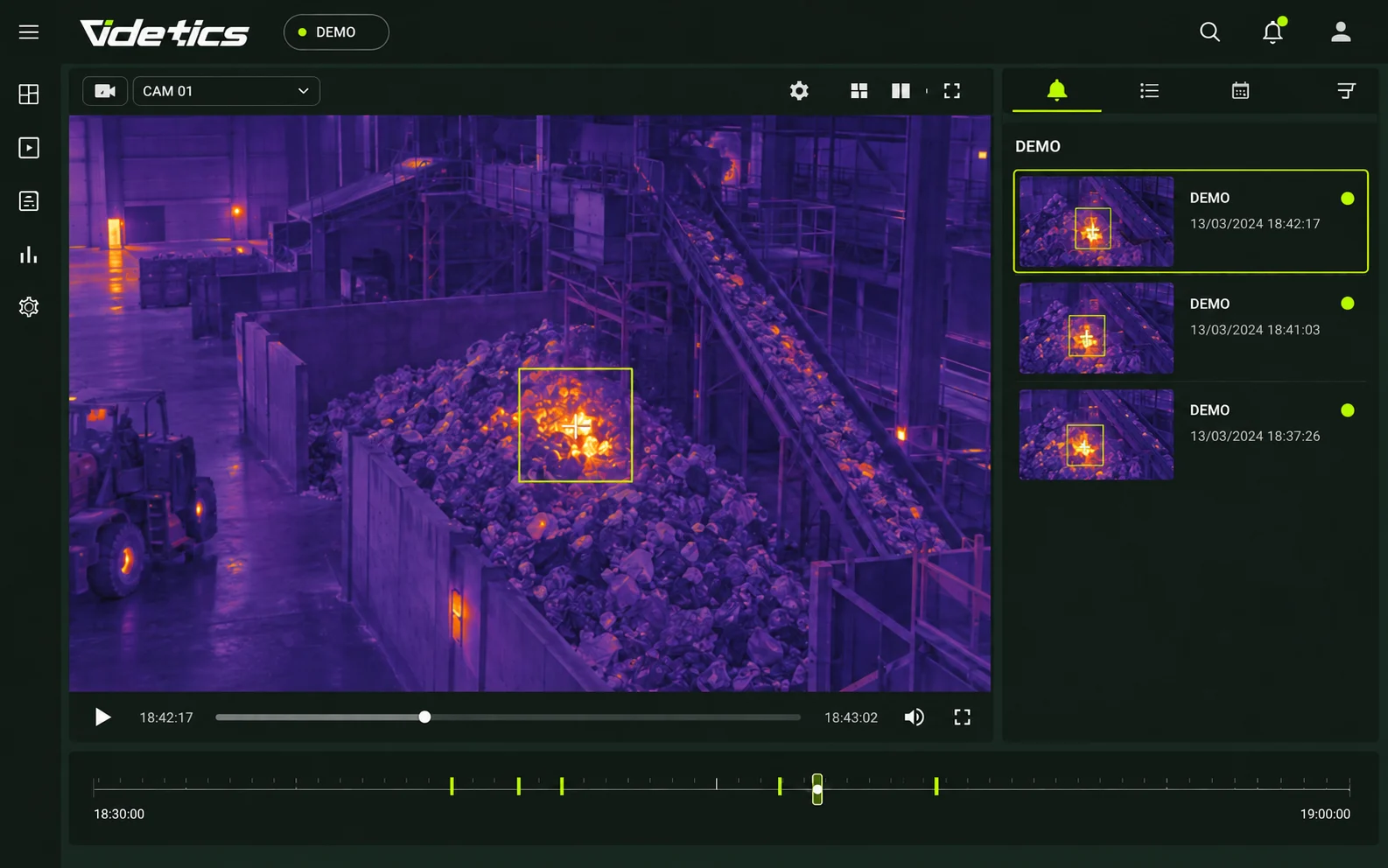
Compatible equipment can flag thermal anomalies in monitored zones. Normal heat sources and thresholds are defined during setup. Alerts complement fire detection systems without guaranteeing detection before smoke or an intervention time.
Remote and unmanned sites
Pumping stations, substations and other remote facilities require local or centralised architectures suited to their networks. Necessary streams, alerts, connection loss and recipients are documented before deployment.
Theft and damage
Intrusion or a prolonged stop in a sensitive area can be flagged. After an incident, attribute searches help select relevant footage. Authorised staff verify events before drawing conclusions.
03 · Operations
Understand flows from gate to loading bay
Cameras can document arrivals, queues and zone occupancy. Indicators are defined with operations teams and validated on a representative sample before use.
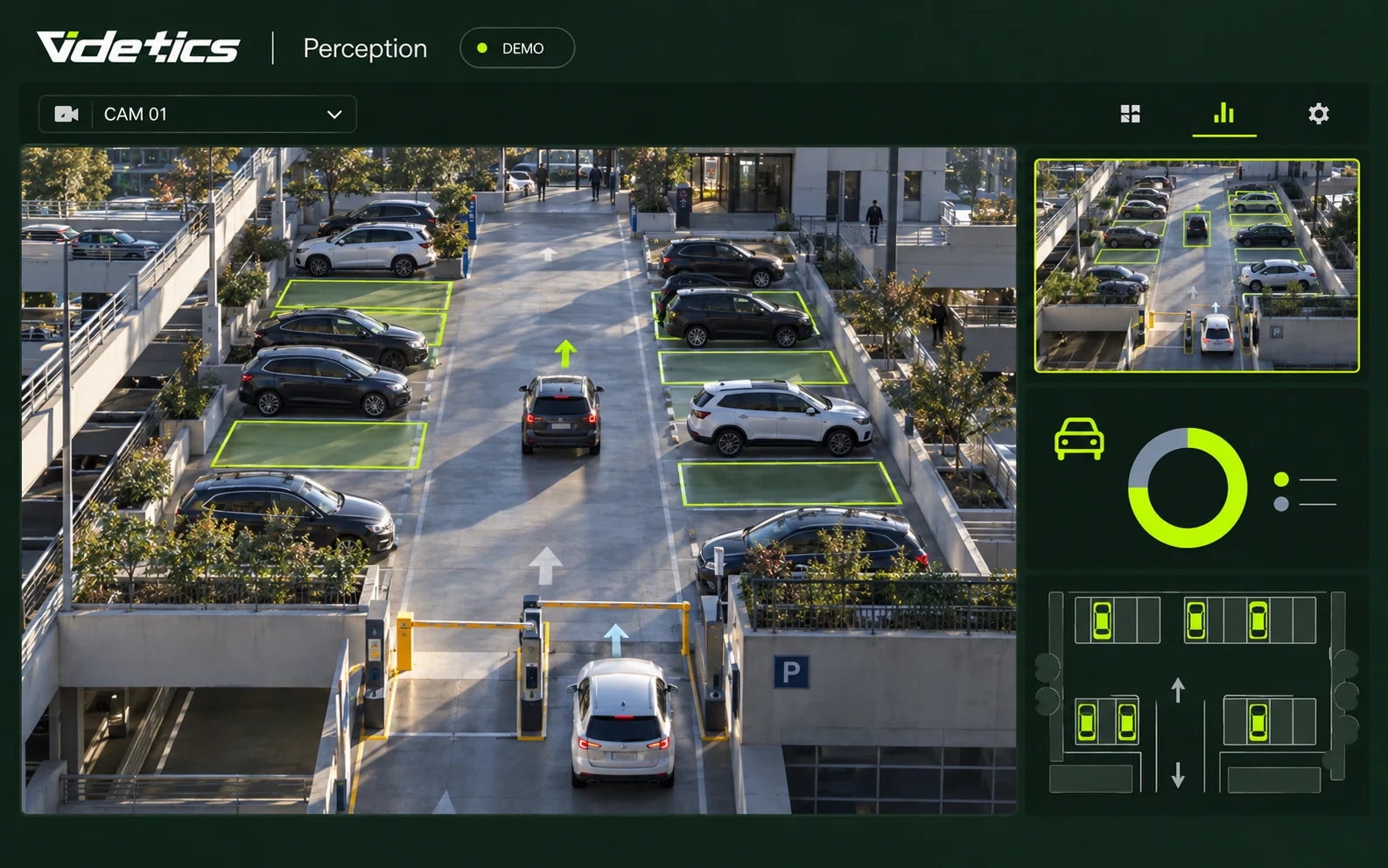
Gates and vehicle arrivals
Count trucks, vans and cars by lane and direction to compare arrival periods. Site-wide turnaround time requires validated coverage and methodology; local dwell time is not automatically total time on site.
Loading bays
Measure occupancy and visible stationary time within a bay zone. Time-based histories help size loading teams and understand bottlenecks. Views must distinguish bays and their access routes.
Internal traffic and parking
Flag prolonged stops near access routes, wrong-way movement or passages outside expected zones. Counts, occupancy and speed estimates inform traffic plans without replacing physical protections.
Post-incident investigation
Filter recordings by time, camera, vehicle type and colour or clothing attributes. Results are possible matches for review. Selected timestamped clips follow your retention and export procedures.
04 · Critical infrastructure
Energy, water and waste: start with site constraints
Large sites, segmented networks and data-sovereignty requirements need precise scoping. The project defines what is analysed, where processing happens and how teams access results.
Wide perimeters and thermal imaging
Compatible thermal cameras can support presence detection across poorly lit perimeters. Usable range depends on optics, resolution, targets and conditions and is verified for each view.
Architecture and data control
On-premises processing is assessed with IT. Sizing, outgoing streams, maintenance, licensing and updates are documented. Operation on a fully isolated network must be confirmed for the selected configuration.
IT security
Permissions, logging, communications protection, maintenance access and updates are reviewed in the technical documentation. Requirements and available functions are validated with security teams; no unconfirmed certification is claimed.
Multi-site supervision
A pilot establishes reference settings and alert-handling workflows. Rollout then adapts settings to each site, using supervision interfaces and metrics that are actually available.
Protect teams within a clear framework
These uses focus on people safety, site security and flow analysis. A proportionate deployment must not become continuous employee surveillance or individual productivity assessment.
Purpose and transparency
Assess local employee-information and representative-consultation requirements with HR, privacy officers and legal advisers. Camera placement and processing purposes must be appropriate to the project.
Access and retention
Define authorised users, necessary retention, image access and auditability. Assess whether a data protection impact assessment is required and which minimisation safeguards apply.
No facial recognition
The searches described use situations and visible attributes, without facial recognition or automatic matching to employee records. Images may nevertheless be personal data.
General guidance to adapt to the project and country. Available documentation and safeguards are specified during scoping; this page does not provide legal approval. The reference below concerns France.
French reference sources
Integrate with your security environment
Visible-light and thermal cameras
Compatible ONVIF or RTSP streams, fixed views and PTZ reference positions. Audit each camera view against the intended scenario.
VMS and security desk
Milestone XProtect and Genetec Security Center integrations; other tools are assessed against available connectors.
Remote monitoring and on-call teams
Agree recipients, available channels, schedules and escalation with providers. Transmission depends on the network and selected interfaces.
Servers and network
On-premises architecture or private hosting according to requirements. Processing, storage, video streams and maintenance access are sized and documented.
Technis Spaces
Available indicators can be combined with group sensor data. Metrics, connectors and reporting frequency are confirmed during scoping.
Industrial supervision
Any exchange with building management systems or PLCs requires a specific assessment. No protocol or safety-stop integration is assumed.
From one site to the whole estate
01 · Site audit
Review angles, distances, lighting, occlusion and operating conditions with EHS and security teams.
02 · Use-case scoping
Define purposes, access, staff information and required steps with HR and privacy teams.
03 · Focused pilot
Select one site, a few cameras and priority scenarios with measurable acceptance criteria.
04 · Tuning and acceptance
Check alerts in real conditions, refine settings and test how teams handle events.
05 · Multi-site rollout
Extend gradually with site-specific settings and an agreed supervision model.
Prepare the project with your integrators
Document scenarios, architecture, interfaces, data protection and acceptance criteria. Timing, service commitments, references and partner responsibilities are agreed for your scope.
Useful information for every team
EHS managers
Situations for review and zone histories to support prevention.
Security managers
Contextual images and scenarios configured by zone and schedule.
Operations directors
Vehicle arrivals, loading-bay occupancy and congestion points.
Group security directors
Deployment methods and alert handling across the estate.
IT and security teams
Architecture, interfaces, access and maintenance documented before integration.
Privacy, HR and employee representatives
Clear purposes and safeguards to assess for people filmed.
Questions from EHS, security and IT teams
Does Perception replace a lone-worker alarm?
No. Video analytics covers camera-visible areas and can complement wearable devices and assistance procedures. It does not guarantee detection of every fall or medical incident and does not replace emergency arrangements. Scenarios are tested under site conditions.
Does it work at night, in dust or steam?
It depends on the camera and what it can observe. Compatible thermal imaging can help without visible lighting, but dust, steam, distance and obstacles can degrade the image. A pilot checks real conditions; seeing through every obstruction is not promised.
Do cameras need replacing?
Not necessarily. The project uses compatible streams and suitable views. An audit identifies usable cameras, useful adjustments and any additional needs. Network compatibility alone does not guarantee detection quality.
How many false alerts should we expect?
Volumes depend on the site, views, scenarios and settings. A pilot measures useful and false alerts over representative periods. Zones, schedules and sensitivity are tuned with teams; no universal rate is promised without measurement.
Can it operate without Internet access?
On-premises processing can be assessed, but licensing, maintenance and update dependencies must be confirmed. Sending alerts to a remote centre requires a suitable connection. Fully isolated operation is not assumed for every configuration.
Must employee representatives be consulted?
HR, privacy officers and legal advisers determine the information and consultation duties under local law. Staff must receive appropriate information, and deployment must be proportionate. Specific obligations depend on the organisation and proposed processing.
Is it a productivity-monitoring tool?
The uses described concern safety and flows, not the productivity, breaks or activity of an identified worker. Configuration and permissions must respect those purposes. The absence of facial recognition does not remove the need to protect images and the people filmed.
How do we deploy across dozens of sites?
A pilot defines acceptance criteria, reference settings and alert-handling workflows. Each site is then adapted to its cameras and network. Supervision architecture and rollout stages are agreed with your teams and integrators.
Explore your project further
Your cameras see the site. Help your teams spot what matters.
Choose two priority areas. Together, we can assess useful scenarios, detection conditions and how alerts will reach your teams.