
Sector · Events, stadiums and public venues
Count attendees. Understand flows. Help your teams act.
For festivals, matches, concerts and community events, Videtics Perception turns video into attendance, density and waiting-time insights. Location-specific alerts help the control room verify situations and direct teams.
Crowd counting and density · Alerts verified by your teams · No facial recognition
AI designed and developed in France. Part of the Technis group.

Measured insights to support decisions.
Control rooms handle many camera views while conditions change quickly. Occupancy estimates, rising density and growing queues give teams a shared picture.
During the event, metrics inform human decisions. Afterwards, they help compare time slots, entrances and editions using a documented method and its limitations.
Count
Measure passages and estimate the number of people in covered areas.
Protect
Flag situations for review: a person on the ground, crowding or presence in a restricted area.
Understand
Analyse entrances, waiting times and periods of peak demand.
Crowd counting
How many people, where and when?
The method depends on the scene: entrance counting, detection in visible areas or density-map estimation.
Entrance counts
Count crossings in both directions at gates and passage points. Someone returning may be counted again: passages are not unique visitors.
Dense crowds
When people obscure one another, a density map can estimate attendance. The result is not an exact person-by-person count.
Capacity and occupancy
Compare entries, exits and zone observations. Coverage of all entrances, initialisation and drift correction are essential to interpreting occupancy.
Method and uncertainty
Assess each view for height, angle, lighting and occlusions. Define validation methods and limitations for reporting without assuming universal accuracy.
People safety
A situation detected. A team informed.
Alerts complement staff observation and emergency arrangements. Selected scenarios must be authorised for your event context.
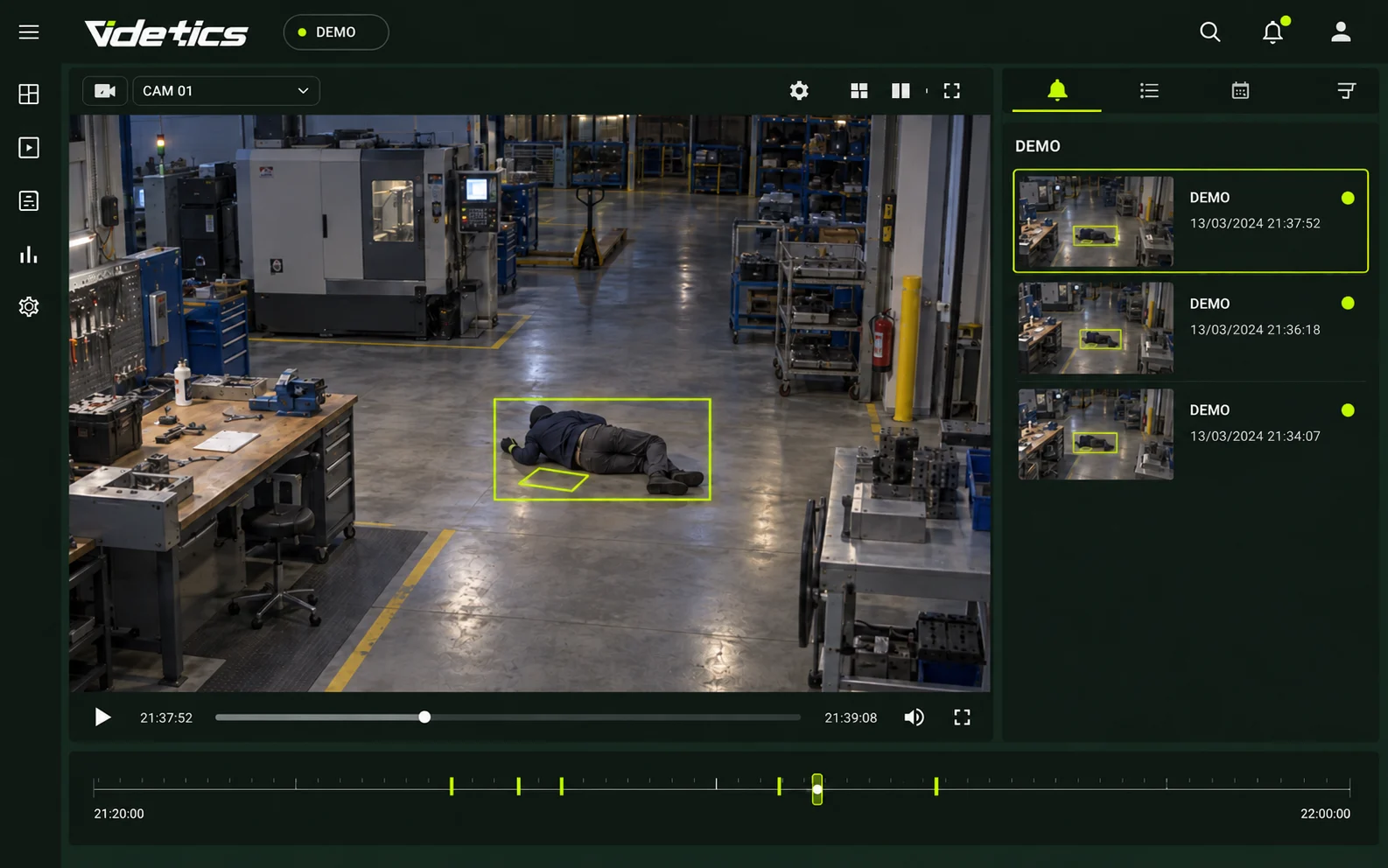
Falls and people on the ground
Detect a ground-level posture in visible areas and send an image with its location. Someone obscured by a crowd may not be detected; this is not a medical diagnosis.
Density by zone
Monitor concentrations in calibrated areas. Safety managers define thresholds according to layout, movement and evacuation conditions.
Crowd movement
Flag collective changes in movement or dispersal under configured, validated scenarios. An alert alone cannot establish panic or its cause.
Restricted areas
Detect presence within a defined perimeter: stage, pitch, backstage or technical area. Staff assess the situation before intervening.
Silent alert
A defined gesture, such as raised hands at a service point, can trigger an alert. Procedures and visibility are tested with teams.
Venue security
Protect venues during and after the event.
Match presence rules to schedules and sensitive areas. A detected behaviour is not proof of intent.
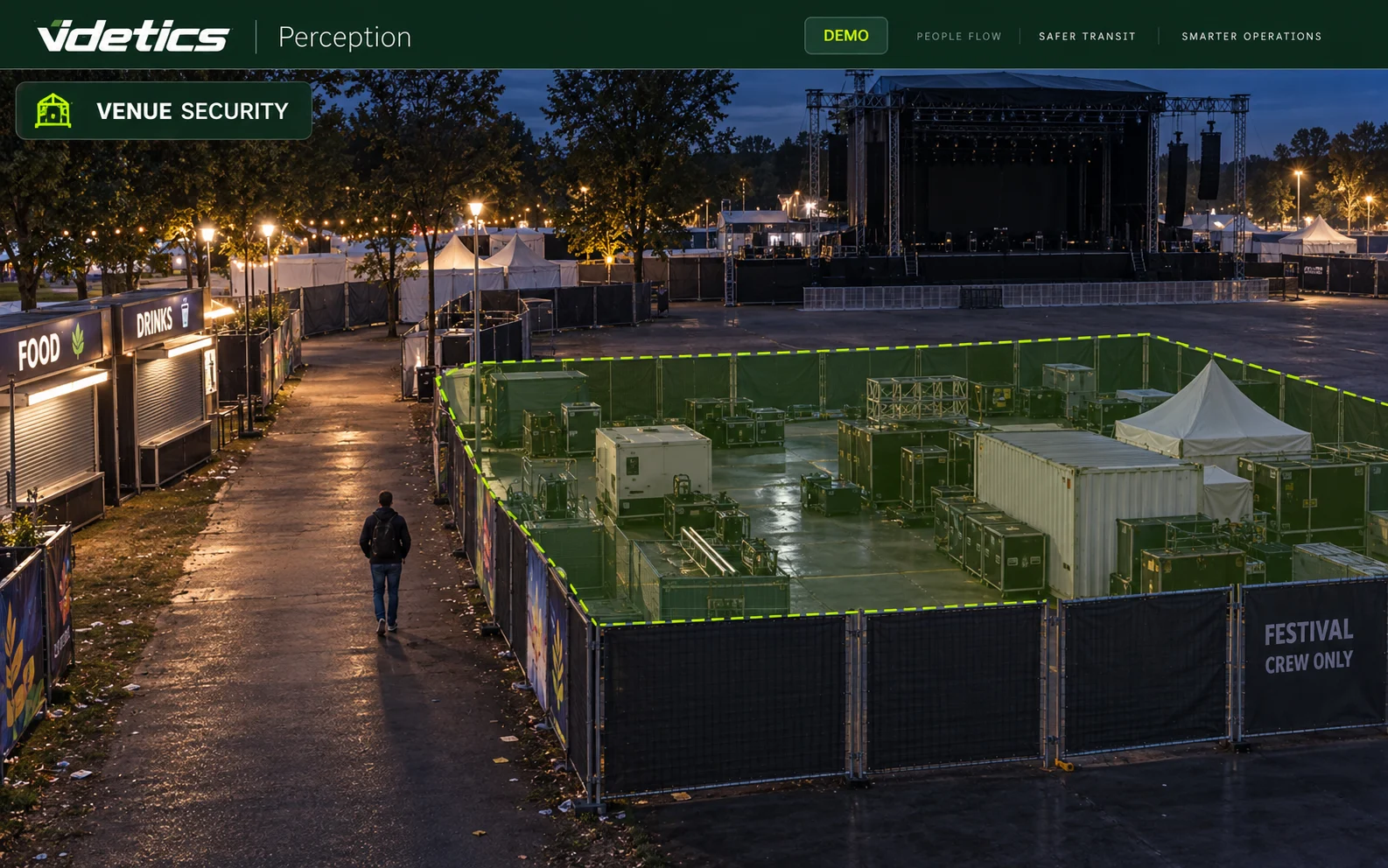
After-hours intrusion
Monitor stage, concession and storage perimeters using configured schedules. Thermal use depends on equipment and conditions.
Protected equipment
Define zones around fixtures and installations. Prolonged presence or a crossing can prompt a check without claiming automatic recognition of vandalism.
Thermal anomalies
With suitable cameras, monitor anomalies in selected areas. This does not replace required fire detection systems.
Post-incident search
In authorised contexts, find footage by time, camera and visible attributes. Matches require verification and do not automatically identify an offender.
Access, flows and reporting
From arrival to the post-event review.
Understand bottlenecks and compare like-for-like periods to prepare the next edition.
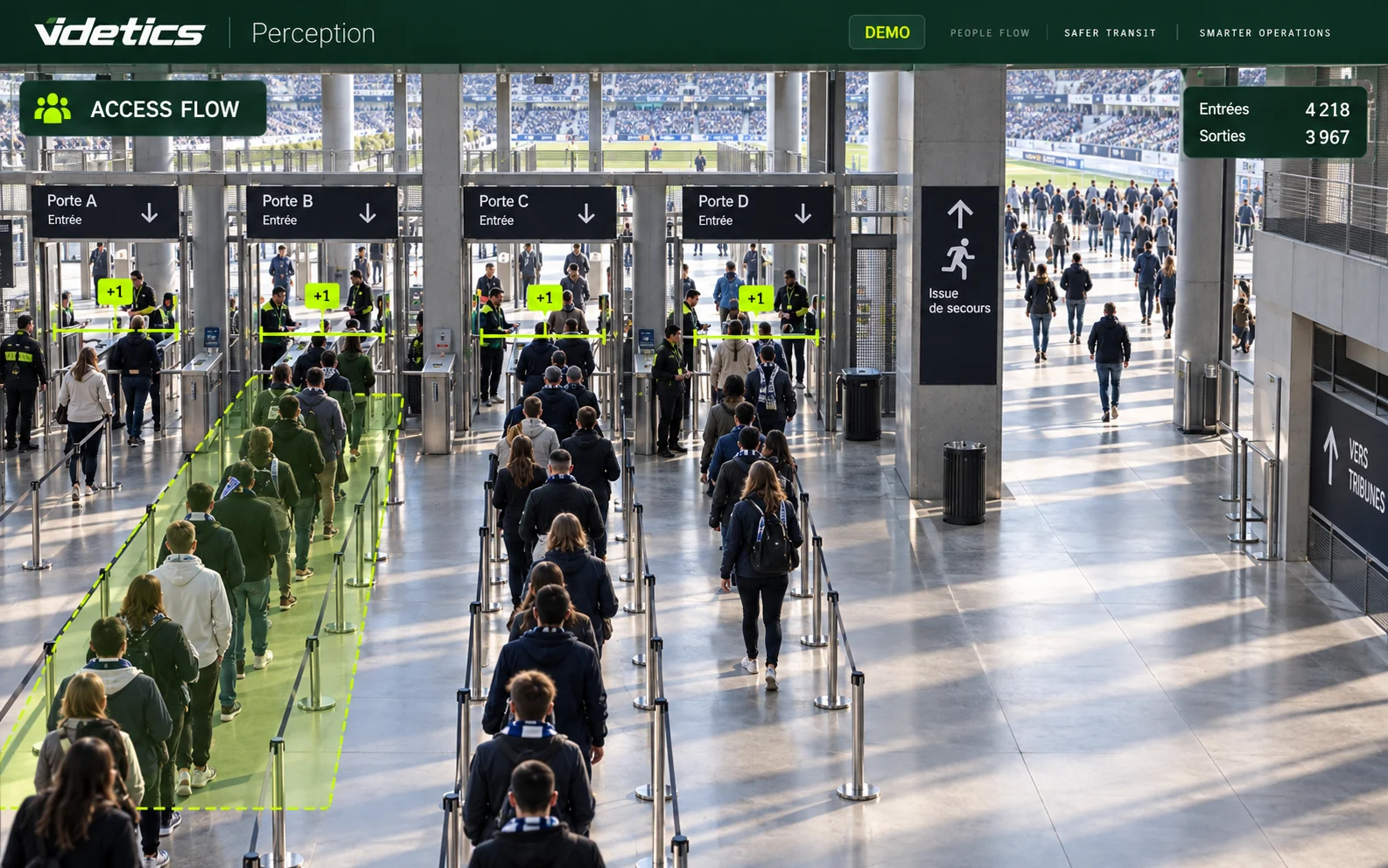
Queues and checks
Measure queue length and estimate waiting time at gates, bars and food outlets where coverage allows.
Movement between areas
Observe direction and volumes between stages, along corridors and towards exits. Opening decisions remain with the safety lead.
Parking and shuttles
Monitor occupancy, vehicle queues and access areas that must remain clear for emergency services. Connect these observations with mobility use cases.
Post-event report
Bring together passages, occupancy estimates, zone peaks and waiting times. Distinguish generated alerts from confirmed incidents and state measurement limits.
A setup tailored to your venue.
Priorities and measurement points vary with the site, programme and visitor arrangements.
Stadiums and arenas
Gate counts, occupancy by sector and observation of aisles.
Festivals and concerts
Density near stages, movement between areas and emergency access.
Halls and convention centres
Room occupancy, reception queues and backstage protection.
Squares and community events
Attendance estimates and flows within a legally validated scope.
Parks and gardens
Passages, opening hours and presence in closed areas.
Museums and landmarks
Reception, queues and occupancy of authorised spaces under venue-specific rules.
Define the framework before deployment.
Producing statistics and triggering operational alerts are different purposes. Venue and gathering type matter as much as the technical function.
Purpose and authorisation
Define uses, zones, recipients and applicable obligations with data protection and legal teams. Technical capability does not constitute authorisation.
Data and transparency
Specify processed images, retention, access and public information. Aggregate outputs do not automatically anonymise the underlying processing.
Political demonstrations
The security and search functions described here are not an offer to track participants. Any statistical project in this context requires a specific legal assessment.
The absence of facial recognition does not establish deployment compliance. Scenarios, thresholds and response procedures must be validated for your event; decisions remain human.
CNIL references for deployments in France:
Cameras and sensors: complementary measurements.
Your cameras
The audit checks IP ONVIF/RTSP feeds, height, optics and visible areas. An additional elevated view may improve coverage of an open space.
Technis sensors
Dedicated sensors can complement entrance counts. Selection depends on passages to cover and validation criteria.
Control room and dashboards
Assess integration with your VMS, including Milestone or Genetec, and Technis Spaces according to selected connectors and metrics.
Prepare the setup before opening.
01 · Scope
Review site plans, cameras, purposes and procedures with responsible teams.
02 · Configure
Define zones, counting points, thresholds and access rights.
03 · Test
Validate views and scenarios under representative conditions, then train teams.
04 · Operate and review
Organise alert verification and reporting, distinguishing observations from confirmed incidents.
One-off or permanent
A one-off event needs an appropriate audit, testing and support schedule. Permanent venues can use event-specific configurations and comparable history. We define the scope with you.
A shared picture for every team.
Organisers
Understand attendance and prepare future editions.
Control room and emergency teams
Verify location-specific alerts and follow response procedures.
Venue operators
Review visitor reception, entrances and after-hours protection needs.
Your event and venue questions, answered.
How accurate is crowd counting?
Accuracy depends on views, density, lighting and occlusions. Dense crowds are estimated. Validation methods and limitations are defined before use; no universal percentage is claimed.
Can you count a demonstration?
A statistical project must be assessed according to its purpose, data processing and applicable law. Producing a number alone does not provide general authorisation. Search functions are not offered here to track participants.
How can a fall be detected in a crowd?
Analytics works on visible people. Someone on the ground obscured by others may not be detected; aisles and peripheral areas often provide better conditions than dense crowd areas.
Which density threshold should I use?
No single threshold guarantees safety. The safety lead sets thresholds according to layout, movement, obstacles and procedures, allowing for measurement limitations.
Does Perception recognise vandalism?
This page presents presence and crossing alerts and post-incident search tools. It does not claim automatic recognition of vandalism or the person responsible.
Can it be used for a single event?
Yes, a one-off deployment can be assessed. Timing, equipment, testing and support depend on the site and use cases, without a universal delivery promise.
Do I need specific cameras?
Existing cameras are assessed during the audit. A different angle or elevated view may be needed to measure a large area or reduce occlusions.
Do you use facial recognition?
No. The uses presented focus on counting, density and observable situations without facial recognition. Video processing still needs a purpose-specific framework.
Explore Videtics solutions.
Your next event starts with preparation.
Share your site plan and camera views: together, we can define where to count, where to measure density and how to deliver alerts to your teams.