
Sector · Public transport and mobility
AI video analytics for buses, trams, metros, stations and airports
On board, on platforms and across concourses, your cameras can also measure. Videtics Perception helps count passengers, understand flows, estimate waiting times and flag situations for review. Use compatible cameras within a technical and legal scope defined for each application.
On-board and fixed cameras · Milestone and Genetec integrations · No facial recognition
Made in France — software designed and developed in France.
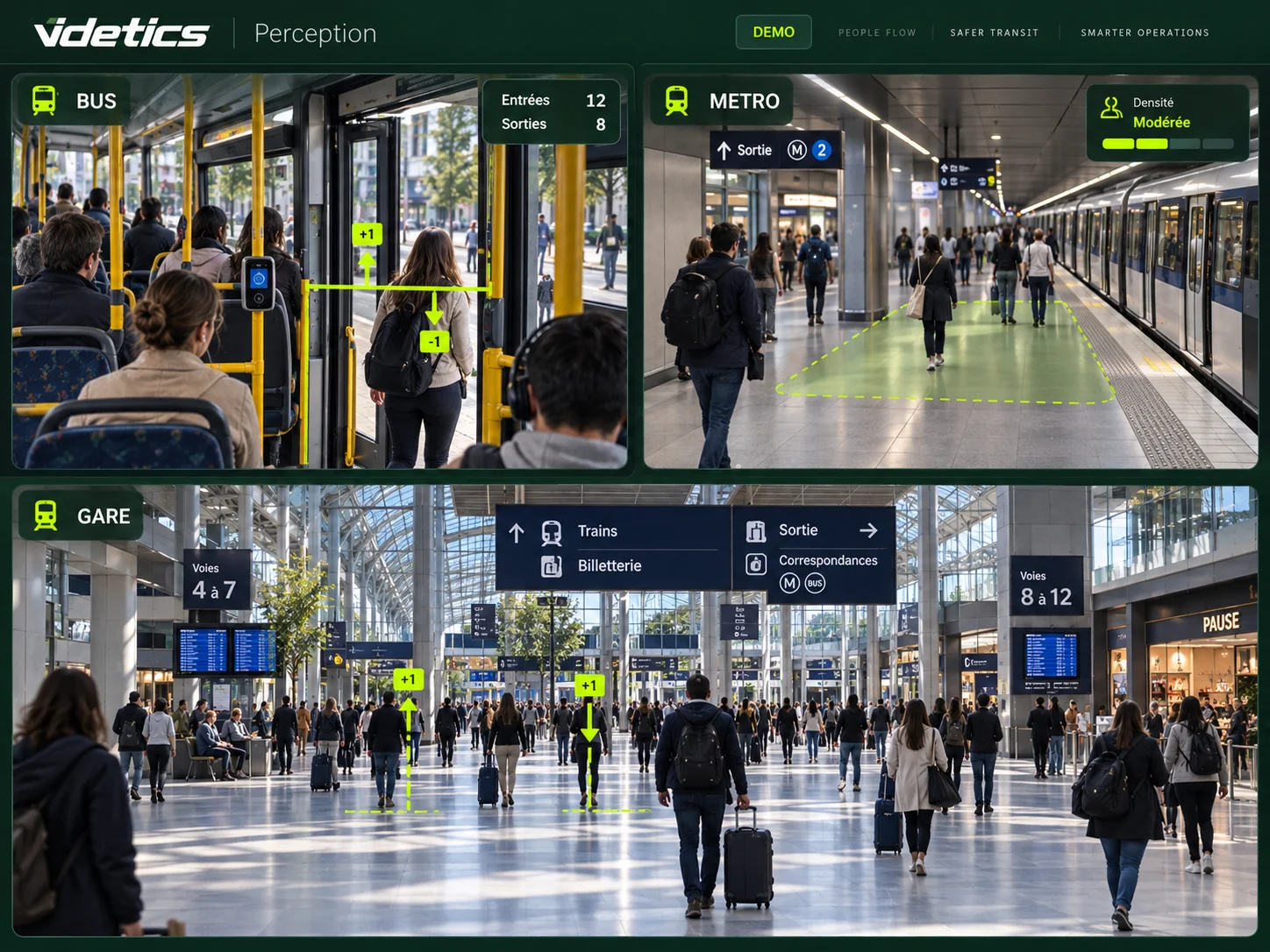
Your network is on camera. Make it measurable.
How many passengers are on the 08:10 bus? Which platform fills first? How long is the wait at security? Cameras installed for safety already see some of these situations. Video analytics can turn those views into useful operational indicators.
Perception complements dedicated access sensors where camera views are suitable. Technis Spaces can bring available indicators together across the network, subject to the agreed connectors and project scope.
How many passengers?
Passage counts, occupancy and load factors by zone or vehicle, using a method validated on site.
How long is the wait?
Estimates by queue or zone to support staffing and passenger information.
What needs checking?
Contextual alerts for review by the security control centre.
Which footage is relevant?
Visible-attribute searches to select footage for an authorised request.
01 · Buses and coaches
Count and protect passengers on board
Interior cameras can complement automatic passenger counting (APC). An audit checks door and cabin coverage, occlusion, lighting and processing requirements before selecting use cases.
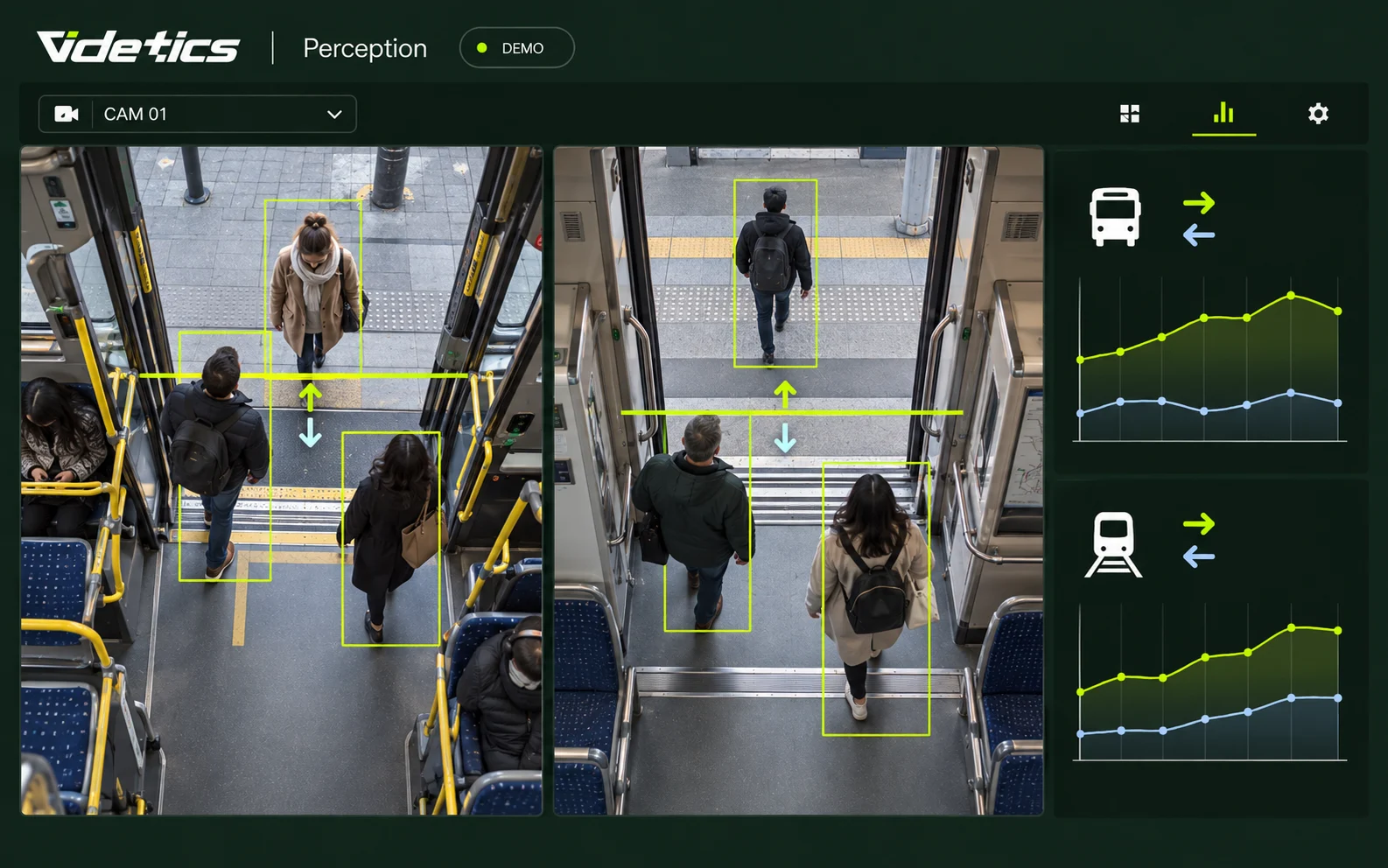
Boardings and alightings
Count passages at covered doors to understand ridership by trip. Assigning counts to stops and routes requires the corresponding operational data. Operators receive time-based counts and, where integrated, breakdowns by stop and trip.
Vehicle load factors
Counting visible occupants helps estimate how full a vehicle is. Measurements are compared with ground-truth counts under real conditions, including peak periods. A load factor requires defined reference capacity and adequate coverage.
On-board safety
Falls, people on the ground or raised-hands postures can be flagged by available scenarios. Live transmission depends on processing architecture and connectivity; vehicle location requires integration with operational systems.
Stops and bus stations
Count people in waiting areas, measure platform occupancy and flag prolonged stops in lanes that must remain clear. Historical data informs timetabling and access planning; operational alerts require an appropriate legal framework.
Depots and workshops
Configure monitoring zones and schedules across depots. Compatible thermal cameras can support poorly lit areas or flag hotspots. Images and event histories help teams verify situations.
02 · Trams and metros
Understand density across stations and trains
Gates measure access. Cameras can add insight into platforms, corridors and vehicles. Indicators support operational decisions; safety actions remain under human control.
Counts by station and zone
Set counting lines and zones to measure passages between mezzanines, corridors and platforms. Time-based indicators complement access sensors and support staffing decisions.
Platform density
Estimate occupancy in visible areas against agreed thresholds. The control centre receives indicators and historical trends to assess conditions and adjust access or service intervals under its procedures.
Track and restricted-area intrusion
Mark restricted areas in suitable camera views. Detected presence is presented with camera and time for verification. The system does not replace railway safety systems or automatically control traction power.
Falls and people on the ground
Posture analysis helps flag a person on a platform or in a passageway. Staff check the image before dispatching assistance. Escalator views require specific validation.
Train occupancy and platform waiting
Suitable on-board views can support estimates by carriage. Platform dwell time may help estimate waiting, but it does not automatically measure time until boarding.
Street-running trams
Analyse pedestrian and vehicle passages near tracks and crossings. Counts and zone-crossing alerts help document conflicts and inform infrastructure improvements.
03 · Stations and interchanges
Understand flows and improve connections
Rail, metro, buses, taxis and bicycles converge on shared spaces. Perception measures camera-covered areas to support station managers and operators, without assuming continuous individual journey tracking.
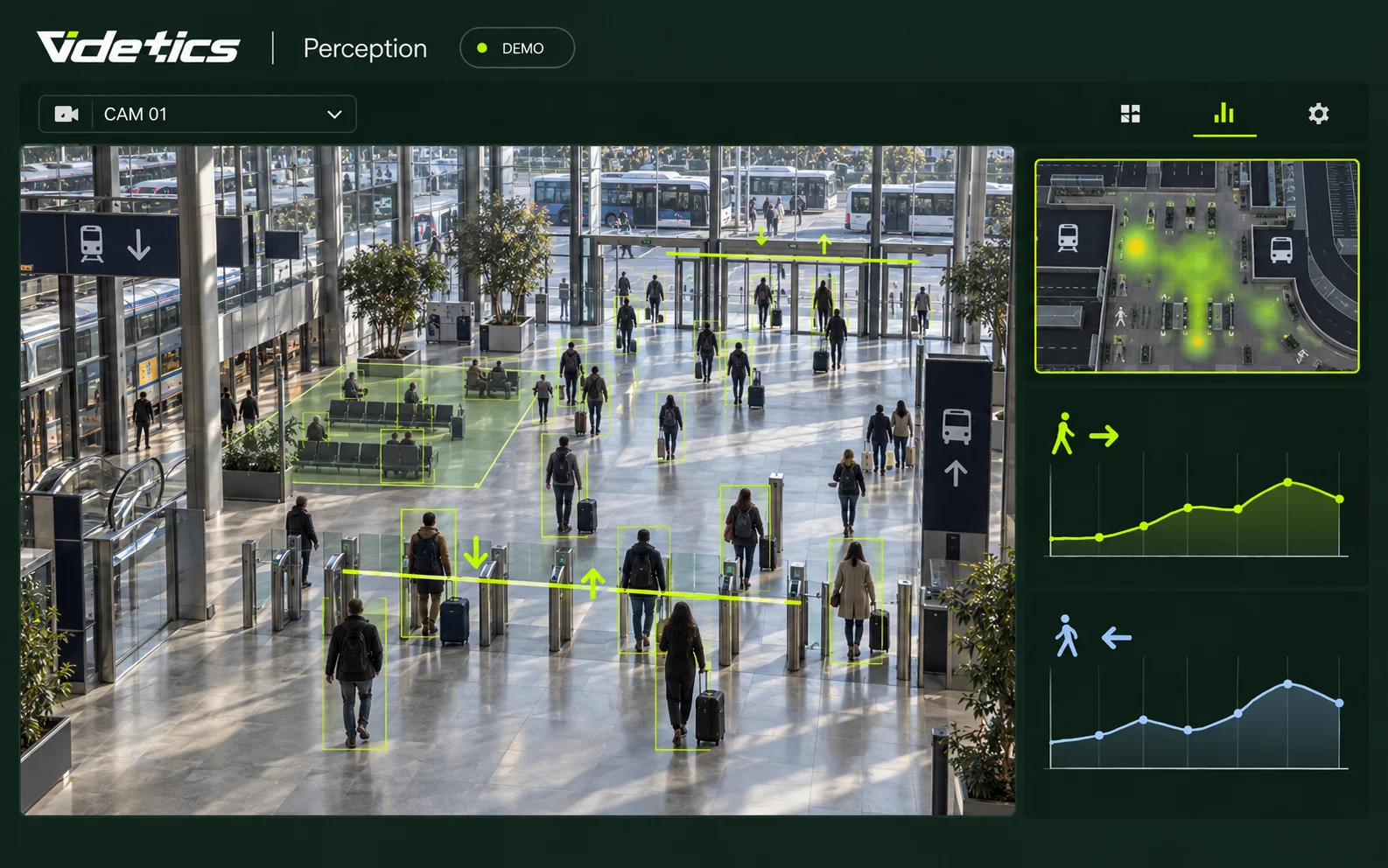
Flows by zone
Compare access counts, occupancy, heatmaps and dwell time across periods to plan staffing, signage and services. Blind spots and double counting are assessed during the pilot.
Queues at ticket desks and checkpoints
Estimate queue length and waiting time where views support reliable measurement. Validated indicators can feed agreed interfaces and support decisions about opening additional desks.
Concourse and platform density
Track zone occupancy during disruptions and holiday peaks. Historical data supports contingency planning; operational thresholds are agreed with teams under the applicable framework.
Forecourts, taxis, bicycles and parking
Count passages by mode, monitor entries and exits and flag stationary vehicles in defined zones. Data helps explain drop-off congestion and park-and-ride usage.
Station safety
Selected intrusion, fall, raised-hands and density scenarios produce alerts with images for control-centre review. Staff assess the context before intervening.
Cleaning and maintenance
Flag deposited objects in monitored areas and compare cleaning needs with measured footfall. Reports document interventions without implying detection of every equipment fault.
Station retail
Passages past units and entrance counts can inform commercial performance when coverage is suitable. These retail metrics are distinct from transport uses and require their own scope.
04 · Airports
Measure waiting from terminal to boarding
Check-in, security, gate lounges and baggage reclaim have different constraints. Metrics are validated zone by zone: camera height, occlusion and queue geometry affect measurement.

Checkpoint waiting times
Count people in a queue and estimate waiting using observable passages or a model suited to its layout. Once validated, trends support staffing; passenger-facing displays depend on agreed screen and app integrations.
Waiting-area occupancy
Monitor gate lounges and baggage reclaim areas. Zone indicators support capacity planning, with thresholds and procedures set by the airport operator.
Passenger areas, lounges and services
Compare counts, dwell time and heatmaps in covered areas. These are measures of space usage, without passenger identification or a promise of continuous individual tracking between cameras.
Curbside and parking
Measure entries and exits, classify vehicles and flag prolonged stops in defined areas. Data helps teams assess congestion and improve passenger information.
Restricted areas and assistance
Zone crossings, falls and postures requiring review may be flagged according to available and authorised scenarios. Security teams assess each event under local airport procedures.
05 · Video investigation
Find relevant footage across the network
An authorised request defines the scope, period and cameras. Perception presents possible matches for staff to verify before including them in a case.
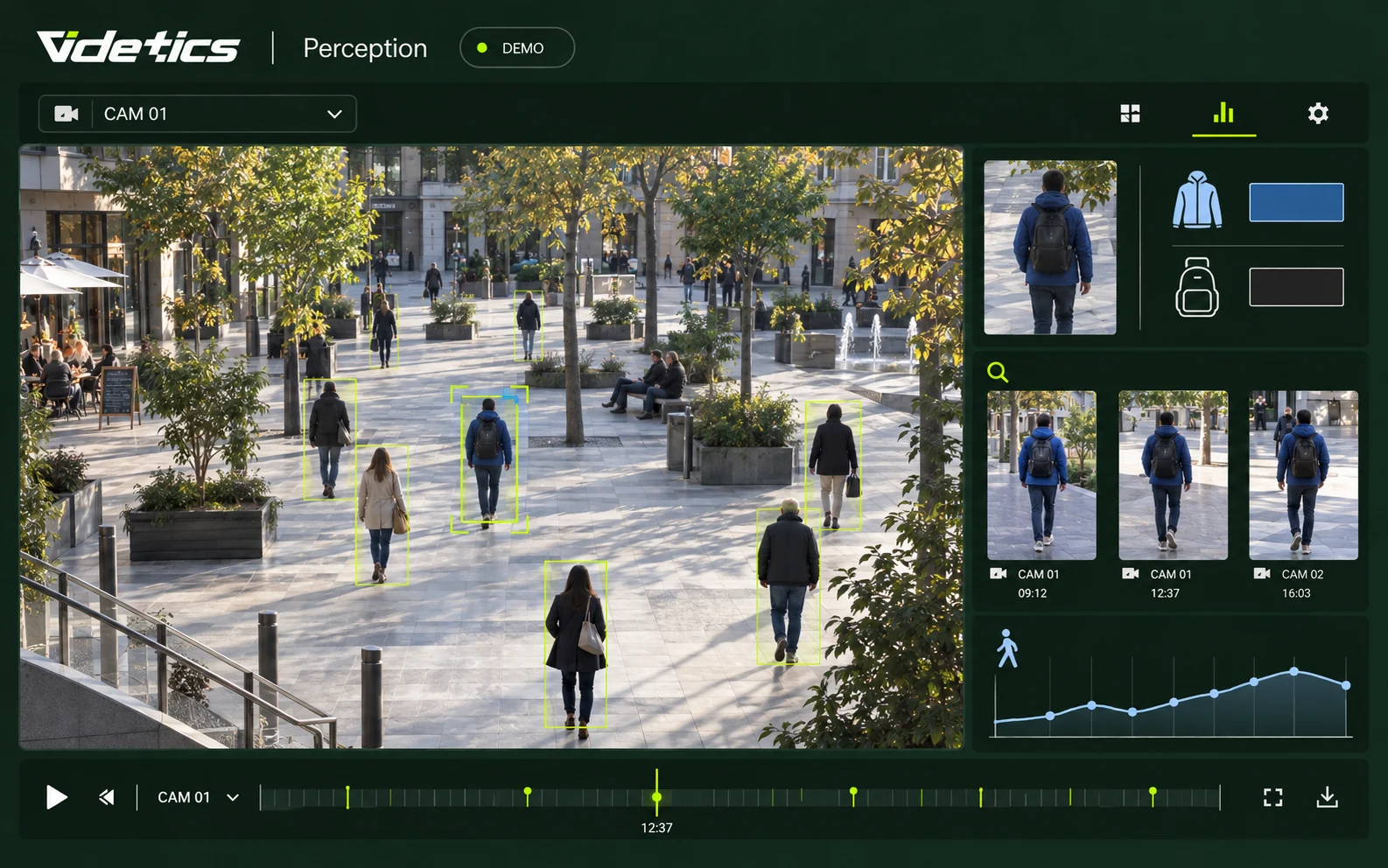
Search by description
Select visible attributes such as clothing colour, a bag or vehicle type and colour. Results link to footage for review without facial recognition or automatic identity conclusions.
Case files and auditability
Group clips with camera references and timestamps. Permissions, logging, exports and retention are defined with your organisation and available functions. A search capability does not itself authorise use of the footage.
Assess each use before deployment
Counting, passenger information, operational alerts and searches in recordings serve different purposes. Privacy and legal teams assess the applicable bases, permissions and operating conditions in the country of deployment.
Aggregated statistics
Anonymous statistical outputs must be distinguished from systems intended to trigger interventions. Image processing, public information and data protection safeguards still require assessment.
Real-time alerts
Operational video analytics in public spaces requires an appropriate legal basis. Check current legislation, permissions and site-specific conditions before activation.
Searches in recordings
Permission to record does not automatically permit every algorithmic search. Validate the legal basis, purpose, access permissions, retention and audit requirements for the proposed use.
General information, not legal approval of a specific project. The French references below illustrate the approach; requirements must be assessed in the country of deployment.
Integrate with your transport network
Fixed cameras
Compatible IP streams, fixed and thermal views, PTZ reference positions: assess angles, lighting and coverage before selecting a camera.
On-board cameras
On-board processing and deferred-analysis options are confirmed with the product team. Power, networking, hardware and connectivity form part of scoping.
VMS and security control centres
Milestone XProtect and Genetec Security Center; other environments are assessed against available connectors. Review workflows are defined with operators.
Operations and passenger information
Route, stop and trip data are matched with measurements through available interfaces. Screen and app publication depends on agreed integrations.
Sensors and Technis Spaces
Access sensors and cameras address complementary needs. Common metrics, connectors and reporting frequency are defined before deployment.
Hosting and network
On-premises sizing or private hosting according to the project. Video streams, metadata, alerts, access and retention are documented with IT.
From pilot to network rollout
01 · Audit camera views
A station and representative vehicles: angles, height, lighting, occlusion and interfaces.
02 · Define the scope
Agree purposes, permissions, passenger notices, access and retention with your teams.
03 · Run a pilot
A limited scope, one or two use cases and measurable goals. Timing depends on the architecture.
04 · Validate accuracy
Compare results with reference counts by zone, time period and vehicle under real conditions.
05 · Roll out in stages
Refine with teams, then extend station by station and route by route.
Prepare your tender
Specify selected functions, fixed and on-board architectures, interfaces, data protection and acceptance criteria. Videtics and Technis can work with your integrators; references, service commitments and contractual terms are confirmed for each project.
Indicators for every team
Operations directors
Ridership and occupancy to compare service provision with observed demand.
Security managers
Contextual alerts and targeted searches for authorised operators.
Station managers
Flow, density and waiting metrics to organise teams and spaces.
Transport authorities
Time-based indicators and, where integrated, route and station breakdowns.
Airport management
Waiting and occupancy data to plan resources and assess service quality.
Privacy and IT teams
Documented purposes, architecture, access, interfaces and retention.
Questions from operators and transport authorities
Can existing bus cameras count passengers?
Yes, where door or cabin views are suitable. The audit checks visibility, occlusion and processing requirements. Accuracy is measured on a representative operational sample before rollout. Not every camera suits every scenario.
How accurate is it compared with dedicated counting sensors?
Accuracy depends on camera views and real operating conditions. Boardings, alightings and occupancy estimates are compared with ground-truth counts over representative periods. No uniform accuracy percentage is promised without validation. Door passages and cabin occupancy are different measurements.
Does real-time processing work on board?
It depends on processing architecture and vehicle connectivity. On-board computing, indicator transmission and deferred analysis options are confirmed during technical scoping. Network interruptions can delay transmission and must be considered for safety applications.
Do cameras or the VMS need replacing?
Not necessarily. Perception uses compatible streams and available integrations, including Milestone and Genetec. An audit identifies usable views and useful adjustments. Technical compatibility alone does not guarantee counting quality.
How do cameras and Technis sensors work together?
Sensors can measure access while cameras cover visible platform, concourse and vehicle areas. The project defines metrics and connectors for Technis Spaces. Overlapping coverage is assessed to avoid presenting passage counts as unique passengers.
Is track intrusion detection authorised?
It depends on the country, purpose, site and current framework. Each scenario is assessed with privacy and legal teams before activation. Permission to operate cameras does not automatically authorise every type of algorithmic analysis.
What about facial or number plate recognition?
The searches described use visible attributes without facial recognition. Vehicle categories and colours can be searched without reading plates. Any separate automatic plate-reading function requires its own assessment and is not assumed to be included.
Where should a large network start?
Choose a station, route or terminal, one or two scenarios and a measurable objective. A pilot validates data, integration and team workflows. Timing and acceptance criteria are agreed after the audit, followed by a gradual rollout.
Explore your project further
Your network is already on camera. Make it count.
Choose a station, route or terminal. Together, we can assess the passenger numbers, waiting times and situations your cameras can help you understand.